Object detection

Synonyms
Particle detection
Isolated object detection
Description

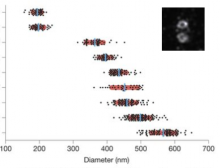
This workflow can be ran with data from 3D-SIM showing the centrosomes in order to compare the distribution of diameters of rings (or toroids) of different proteins from the centrioles or the peri centriolar material. It aims to reproduce the results of the Nature Cell Biology Paper Subdiffraction imaging of centrosomes reveals higher-order organizational features of pericentriolar material  from the same data set but with a different analysis method.

It is slightly different from the methods described in the paper itself, where the method was to work on a maximum intensity projection of a 3D-SIM stack, and then to fit circle to the centrioles to estimate the diameters of the toroids.

In this workflow, the images are read from the IDR , then process by thresholding (Maximum entropy auto thresholding with Image J), and processed by Analyze Particles  with different measurement sets, including the bouding box. Then the analysis of diameters and the statistical test are performed using R. All the code and data sets are available, and in the case of this paper have shown a layered organisation of the proteins.

Combined view from Figure 1 Lawo et al.
Description

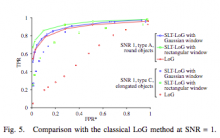
Part of ATLAS software

Comment / Instructions: 

You can upload your image at the Mobyle@SERPICO portal and download the result. The workflow is only available online, i.e. no download possible.

Description

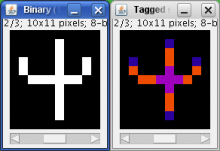
This plugin tags all pixel/voxels in a skeleton image and then counts all its junctions, triple and quadruple points and branches, and measures their average and maximum length.

Tags are shown in a new window displaying every tag in a different color. You can find it under [Plugins>Skeleton>Analyze Skeleton (2D/3D)]. See Skeletonize3D for an example of how to produce skeleton images.

The voxels are classified into three different categories depending on their 26 neighbors: - End-point voxels: if they have less than 2 neighbors. - Junction voxels: if they have more than 2 neighbors. - Slab voxels: if they have exactly 2 neighbors.

End-point voxels are displayed in blue, slab voxels in orange and junction voxels in purple.

Notice here that, following this notation, the number of junction voxels can be different from the number of actual junctions since some junction voxels can be neighbors of each other.


Output data type: table result, image of the skeleton

 

Description

ADAPT is capable of rapid, automated analysis of migration and membrane protrusions, together with associated
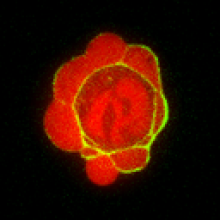
fluorescently labeled proteins, across multiple cells. ADAPT can detect and morphologically profile filopodia.

ADAPT (Automated Detection and Analysis of ProTrusions) is a plug-in developed for the ImageJ/Fiji platform to automatically detect and analyse cell migration and morphodynamics. The program provides whole-cell analysis of multiple cells, while also returning data on individual membrane protrusion events. The plug-in accepts as input one or two image stacks and outputs a variety of data. ADAPT may also be run in batch mode.


has function
ADAPT logo
Description

A standalone cell tracking software for single cell migration. Tracking of cells in tissue was also done in Drosophila germband.

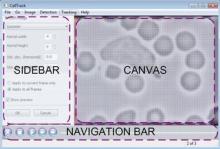
GUI image (from http://sacan.biomed.drexel.edu/celltrack)